Problem
One of the premier destinations for a vacation is a Disney experience. Whether it's a theme park or a cruise, countless people spend a lot of money to have one of the most magical experiences of their lives. As a person who likes to plan his vacations, I did not know how to begin. Disney has created a site to help people, but it's very confusing and isn't really organized in a way that I can use to plan a vacation. I like to talk things out when I plan trips, so I had an idea of how to solve this problem.
Website Disney made to help people plan

Can I create a Voice UI to help me make decisions and plan out a Disney vacation?
Research
Resources
Different Disney Vacation Options

Before I can create the the Voice UI I needed to understand what each kind of vacation was like. Normally I would conduct research for a design project by talking with users, asking them about their experiences. However, this project was really for myself. So I instead I focused on trying to identify the different types of vacations Disney offers. I looked a few different places:
- Disney's Planning site
- Disney's Vacation Club site
- Disney Cruises site
- Disney Land's site
- Disney World's site
Analyze
Going through the different site took a while and was a bit overwhelming. I don't know how someone can go through all this and come out the otherside knowing exactly what they want to do. I did come to a couple of conclusions that can help someone understand what a Disney Vacation is like:
- Disney Land and Disney World are both called resorts and have separate parks
- Cruises are fairly straight-forward
- Having a ticket to a park doesn't guarantee you can go. You have to reserve a spot
- There are a lot of dining options that require reservations
- The planning Disney is offering isn't useful for helping someone who doesn't know what to expect.
Disney World's Things to Do

Solve
With these issues in mind, I decided to try to use a voice ui to help me created a vacation. I turned to a video series by Alexa Developers Youtube Channel to help me with my approach to voice. In their videos, they use a series of steps with a couple of artifacts to get a prototype going.
Value Proposition
The Value Proposition for the Disney VUI

First thing I had to do was to come up with the concept. That was already done. Next was research, which once again I had done some already. Now I did plan on testing my idea with other people down the line but I wanted to get something up fast to help me understand how to make a VUI first, so the research I had already down would suffice. That means the next step was the value proposition. I took their format and answered each section.
Situational Design
The design method that the video series followed was called Situational Design. The idea was that you can create a basic design for a voice ui if you focus on the situations it will be used in. This is in contrast to creating a flow chart that would end up being incredible large and unwieldy. I start with creating a "Happy Path" conversation so I know what it looks like for my users to reach their goal.
The Happy Path of using the Vacation Planner

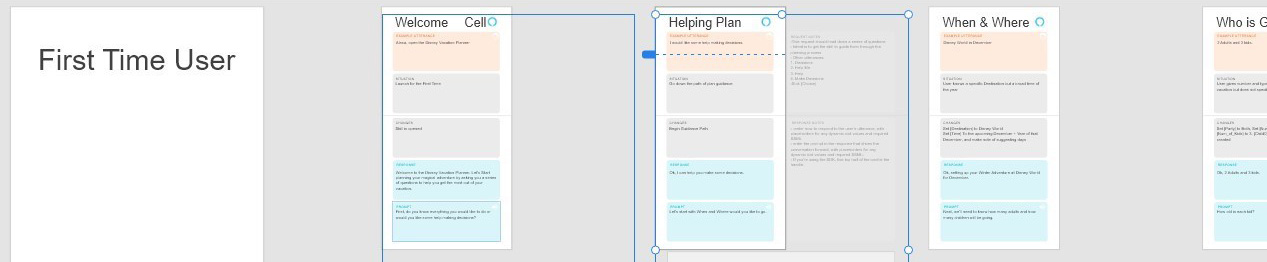
With the script set, I used the Xd template they provided to create the flow of the conversation. The template had cards that captures a user's utterance and how the vui will react. What's nice about the cards is that they have sections for things that happen in the backend to help developers know what should happen. I can note Slots, difference utterances, intents, how variables change. I can even mark the situation so that as I make knew cards I can show where the paths change. I would then order them in the sequence of the conversation to create the flow
A Blank Card with description of what goes in it.

Card Filled Out showing the User ansering a previous prompt

Cards in the sequence of the conversation
Outcome
After all the work of one scenario, I am able to see a lot more of how the vui will function. Just by going through 1 path I can already see issues and different paths that need to be addressed, all without even having to test with a user. I'm going to look more into situational design and come up with more paths to capture. After that will be a Wizard of Oz test to capture more utterances. Hopefully I can actually build this VUI at some point.
Retrospective
I can definately see why Voice UI development uses situational design. Being able to capture paths withought having to draw out an unwieldy flow chart can help you find issues quickly. It is a lot of writting though, so it may not be for poeple who don't like to write. I'm looking forward to use it more.